Showing posts with label Software. Show all posts

Saturday, September 26, 2020

School Bell Timer - Free for all

Hello friends and strangers, it has been ages since my last post. However, recently a friend suggested to write about my hobby projects over a coffee... so here I am. I am an Administrator by Profession, a technology enthusiast/hobby programmer by choice.

I understand that there are solutions to use commercially available software for free, however these solutions are ethically and morally incorrect.

School Bell Timer MV Screenshot.

Most projects are initiated because there is a need, but some are not. In this case, there is a need. Sometimes co-workers ask for my help in technological matters, because of my IT background. Likewise, very recently a coworker asked me for help in putting an end to the annoying cycle of using trial software to sound the bell.

The school uses it's intercom system to play bell sounds, which is convenient. The problem was to find a free software to do the job.

So I scheduled this hobby project for the weekend, and it's done.

Here is how to get it: just download the file(s) from the link below. You'll find instructions enclosed in the zip archive.

https://drive.google.com/drive/folders/17J7Ytk3anQ7EyNTZ2Yz3fyVgMa2Ap78l?usp=sharing


Thank you for your time :)

Sunday, September 2, 2012

Thaana font and keyboard for Android Phones

Update: (27/9/2014) A new intaller has been released. Check out the play store http://goo.gl/Ba43TS. Still requires root.


New Thaana Fonts+Keyboard for rooted Android devices.

The steps described below may or may not work for newer android phones. The following method is for the Gingerbread version of Android.

Android OS has embedded endless fear in the hearts of the jealous Apple fans. Whether you believe it or not, the open source operating system has truly put smart phones in the hands of not just insanely rich people, but everyone. We love you Google. So you are here because you probably need to type Thaana (probably for commenting on social media sites). And man! you are at the right place. Just hang on for a while. Disclaimer: don't hold me responsible if your phone gets bricked or explodes!

 1.Root your phone. you can easily root your phone with SuperOneClick (freeware).
Make sure you have "Super User" and "Busy Box" apps installed (normally after rooting you will have these apps installed by default).

 2. Download Dhivehi-signed.zip and copy the file to the root of your SD card.

 3.Boot into recovery mode, to do this:
Turn off the phone
 Samsung: Hold VolumeUp+Center Button+Power
 HTC: Hold VolumeDown+Power
Your phone will go into recovery mode.
 (The specifics on how to enter recovery mode depends on the manufacturer and device. So use Google to find out how you can get into recovery mode)

 4.Select the "update from zip" option in the recovery menu and select the Dhivehi-signed.zip file on your SD card and OK it.
 5.Wait until the update finishes.. and reboot your phone.

 6. Find "MultiLing Keyboard" application in your  drawer and open it.
 Select Enable MultiLing Keyboard from the menu and select MultiLing Keyboard.


 7. Go back and select "Enable Languages" option. Check use "MyAlpha font" and Scroll down to select Dhivehi Language

8. Now open Messaging and Compose a new message

9. Select the input field and hold down to bring up the  input method selection menu, and select "input method". Now Select “MultiLing Keyboard”  from the selection menu.


10.Once the "MultiLing Keyboard" is installed and enabled,  all you have to do is touch and hold the space bar, and select “Dhivehi”, to change the keyboard to dhivehi.
12. You are done.. Congratulations!

Tuesday, September 27, 2011

Ultimate online security explained

Codexero Blog - Ultimate online security explained.

You are probably here because you are concerned about the security and privacy of your online presence. You maybe shocked to know that major search engines and social networks like Google,Yahoo, Bing and Facebook keeps track of what you search and which other websites you visit. In this article I am briefing about password security, email encryption and online privacy.

Tuesday, August 23, 2011

Thaana font installer for everyone.

Dear fellow Maldivians.
When we thought that our language and alphabet were on the verge to extinction we were blessed with the freedom of expression. The new era of freedom cut loose the talented journalists and bloggers living in deep dungeons and caves. The result? News and information in the form of Magazines, broadcasts and electronic media started to show on air,cloud and shelves. Font installation is an easy process, but there is a little chance that there are less priviledged fellow Maldivians who find it difficult to find thaana fonts and install them on their PC. So I decided to create this little utility called the Codexero Thaana font installer for all you guys. There are two versions available, which are the 64-bit version and the 32-bit version.
Download the 64-bit version for newer PCS/Laptops
Download the 32-bit version for older PCS/Laptops

So, enjoy!

Saturday, July 30, 2011

Damn tiny computers for developers and geeks.

Globalscale DreamPlug 036000291452 GHz Class Linux ServerWe are living in a very blessed age, with information super highways and terabytes of data at our finger tips. Tablets, laptops and smart phones are cool, but geeks with innovative ideas and lust for entertainment and control would love plug computers.
Plug computers are tiny computers mostly running Linux operating system. Features and components vary from device to device. Some of the plug computers have HDMI ports, USB ports, Ethernet ports, Wifi and expansion card slots. You can connect a portable hard disk to one of the USB ports and use the device as a DLNA server which streams audio and video to supported devices.

There are hundreds of uses including Security surveillance, web hosting, Media streaming etc.
A good practical use would be developing and deploying an IM bot which executes certain tasks such as updating your Facebook status, Sending an SMS etc, when you message the IM bot. Cool huh! All you need to do is command the bot through your favorite chat application.

What about running Smoothwall on the device? Smoothwall is a powerful open source firewall for the Linux OS. If your router's built-in firewall isn't enough for you, then Smoothwall is the answer.

In fact some of these devices are a development platform, on which you can deploy various applications. Its definitely a must have gadget for the geeky Geeks. Enjoy!

Monday, July 11, 2011

Crack your own Windows7 Password! Break into the Windows system.

Practical Guide to Linux Commands, Editors, and Shell Programming, A (2nd Edition)Hi guys, good day to you.
Before we break into the Windows system lets prepare for the final challenge.
Most of us use Microsoft Windows in our daily office tasks. If you are a gamer, programmer or a journalist you are most likely be using Windows. Of course you can do without Windows, but it has become a sort of culture to use it, because majority of the users seek simplicity.

For geeks and Linux fans, running a smart OS like Linux from a flash drive would be more than fun. There are tons of possibilities such as running BackTrack, GParted, Ubuntu and other Linux flavors each of which is designed for special purposes. BackTrack is a security testing and assessment tool built n top of Linux kernel while GParted is designed for disk management. Ubuntu is a full featured operating system.

Preparation

Download your flavor of Linux from these download links.
GParted       - Disk Management
BackTrack   -Security Assessment and Testing
Ubuntu        -Full featured OS.
Xubuntu      -Full featured OS.

Download a Live USB creator tool.
UNebootin                     - Available for Mac, Windows and Linux
Live USB Install           -  Available for Windows and Linux
Universal USB Installer - Available for Windows
FUSBi                         - Available for Windows and Linux
YUMI                          - A multi boot installer (Windows only).

Installation

After downloading your favorite flavor of Linux and live USB creator tool, lets jump head first into installing Linux.

Run and install the live USB creator tool. In this case I am going to use UNebootin to install GParted (Disk Management Linux).

Firefox running on GParted (USB boot).

Tuesday, January 5, 2010

The Codexero BOT - An experimental IM bot

UPDATE: THE BOT SEEMS TO BE OFFLINE. THE BOT HOSTING SERVICE IS EXPERIENCING PROBLEMS.
The codexero BOT is the result of my experimental approach to getting useful information within the IM client itself, in a hassle free manner. The error rate is at maximum since the back end for the BOT is hosted by a free web server. During the tests the BOT performed quite well, although some down times were experienced.

Currently the Codexero BOT can get the latest flight information, display word definitions and display information on places, people and things.
codexero@msn.com

Some useful commands:

info - Display information on a query, example: info Maldives
dict - Display word definitions, example: dict hello
flight - Display flight information, example: flight sq451.

I would appreciate any feedback provided.

Thursday, November 5, 2009

Emergency data destruction

Do you remember the leaked pictures and documents from a Maldivian Minister's Computer? Are you planning to sell your PC? Even if you formatted your hard disk, your data is still there. Anybody with the right tools can recover your data easily. All your photos, personal documents may appear on social networking sites the next day.

Another Scenario
-----------------
You are an activist, secretly working to topple an autocratic government, and one day somebody knocks your door. You find out that they are from the secret service. And you have tons of information on your computer which they can use against you. What do you do?

So what's the solution. The easiest and best solution is to remove the hard drive and keep it somewhere safe. What if you need to destroy the data on the hard disk? Well, fortunately generous programmers have developed applications which wipe out the data completely from your storage device..

Darik's Boot And Nuke securely wipes data completely.. Its an ISO file which your can burn on to a CD or DVD, and all you need is to boot the Computer with the CD/DVD.

Download: Darik's Boot And Nuke

If you need to destroy individual files on your hard disk without completely destroying all the data then check out Eraser

Sunday, November 1, 2009

Maldivian Media Copyrights Protection Attempt!?

As most Maldivians are aware of,  Maldives does not have any laws and regulations on copyright protection. This has led to many losses in the film and music industry in the Maldives. A guy buys an original DVD or CD and his friends will receive copies of it, and they distribute more copies to their friends and son on.


To battle this problem, film and music producers put malware on the DVDs and CDs that make use of the autorun feature of your Windows. So as soon as you insert the DVD or CD into your PC the malware executes itself disabling the task Manager, Folder Options, Hiding your Drives and altering many other system settings. After infection the system shutdowns itself after a certain period of time, normally after six minutes. The DVDs and CDs are only meant for players.

Though this attempt cannot prevent an average Maldivian from using the DVDs and CDs on their PCs, some common users fall victim to the malware. I believe that copying and distributing other peoples work without the owner's consent is totally unethical, but I also believe the rights of the end users. Why can't they play or watch the films on their PCs? The producers does not have the right to put malware on their production media and infect the end users.

How to get rid of the Malware.
--------------------------------------------------------------------
Click your Start Menu and Select Run.

Type shutdown -a and press OK. Repeat this if the dialog box (displaying the countdown) on your screen does not close.

Click your start menu and select Run.

Type msconfig and press OK. The System Configuration Utility should open.

Select "Startup" tab.

Look for entries with random names (normally 3 or 4 letters).

Uncheck  the suspected items (You may need some knowledge of the processes running on your PC). Then click Apply.

If you did it right then you have disabled the malware. Now you need to restore the system settings.

Download and install TweakUI from Microsoft

Download Remove Restrictions Tool: http://www.box.net/shared/mtueogguog

Run the RRT Utility and Click "Enable All" Button.

Now open the TweakUI utility.

Select MyComputer > Drives from the tree menu. Select all drive letters and click OK. Now Log Off and then Log On again. If you still can't see your drives in MyComputer then click Start Menu > Run. Type Regedit and click OK. This should open your registry editor.

Now Press Ctrl+F.

Type NoDrives and click "Find Next" Button. Wait for the search to finish.

If you see "NoDrives" Entry in the right pane of the Regedit window delete the entry.

Press Ctrl+F again. Click "Find Next" and wait for the search to finish. Delete any entries in the right pane with the Name "NoDrives".

If you followed the instructions correctly then it should fix the problem. If it doesn't then Check the CodeXero Remove Restrictions Utility.

Have a great day!

Thursday, October 29, 2009

Google Wave Alternatives

So you have signed up to supposedly Google Wave invitation sites? Have you? Unfortunately most of the sites are spam sites, therefore you never receive an invitation from them.

Google Wave has been around for some time, but within a limited and closed group of people. Many interested users are desperately looking around the web to get an invitation. Google Wave is supposedly an innovative solution for social networking. Users actually interact with each other in a live virtual environment. They see each individual letter of a message as it is being typed (not before it is typed ;-) ). Google Wave will likely revolutionize Social networking. Are you abandoning Facebook or Myspace?

  screenshot
If you are not among the lucky guys who received Google Wave invitation and if you can't wait to take a glimpse of it then you are at the right place. However the solution is not as good as Google Wave itself, but at least you can try some of the features of Google Wave. 


The solution is Pygowave, which is  web based and open source, from http://pygowave.net

Alternative desktop Google Wave Clients.


Waver is based on the  iphone version of Google Wave.
To try Waver for yourself Download and install Adobe Air from http://get.adobe.com/air/?promoid=BUIGQ (15 Mb).


Note: To use this application you need a Google wave account.


Enjoy waving!

Wednesday, October 28, 2009

Dare to forget your passwords except one?

Are you having trouble remembering your passwords for numerous web services you use? Are you afraid to login to your accounts from public computers, or are you just lazy and don't care to remember all the passwords? Remember, whatever solution you use you will need to remember at least one good password. This password will allow you access to all other passwords.


There are many password applications available for free, but who wouldn't love to login to a website and login to all his other web services from that website.

Some of the most popular windows password management program is Keypass. If you are interested get it here: http://keepass.info/

Passpack is a free online password management service which allows you to login to other web services without ever entering the password for that website. You only need a one time configuration by entering the username and password for the particular website.

Clipperz is another online password management service which is similar to passpack (which is also a great service). Just enter the password and username for your online accounts and configure them using a bookmarklet available on their site.

Find out how to setup and configure your accounts by viewing the screen cast.


Enjoy!

Monday, October 26, 2009

Download Messenger plus Live 4.83.372


Wait! What is Messenger plus Live? Those of you who don't know about it read on. Messenger Plus! Live is an add-on for Windows Live Messenger that adds tons of features and extras to the software. Extend the possibilities of Messenger and make your experience a lot more entertaining!

Windows Messenger and Windows Live Messenger are great, but I don't use them because I chat directly from Gmail. I used an open jabber server to connect to all my instant messaging accounts including msn and yahoo. Major advantages of using Googletalk to chat with other instant messaging services are simplicity of use, chatting all instant messaging services from one window. And by the way, Googletalk automatically stores all your chat conversations on the web, not on your computer. You can see all your chat logs in your Gmail account.

Anyway for those who use the Windows Messenger, this addon is great. This update of Messenger Plus Live was released on Oct 17 2009.

Go ahead and grab yours from :http://www.msgplus.net/

Sunday, October 25, 2009

Install all your softwares in one go


After reinstalling windows it takes a considerable amount of time to install all favourite software, one by one. In the past I have used batch scripts, which make use of the silent installation feature of many modern day installers. It wasn't such a time consuming task to do some scripting and take a break to let it finish all the installation.

Sample batch Script
ECHO Installing acrobat Reader 7.0
"%CDROM%\software\Acrobat Reader 7.0\Adobe Reader 7.0.msi" /qb

Echo Installing Shockwave and Flash Player
Echo Please Wait.....
Copy "%CDROM%\software\ShockWave And Flash Player\mms.cfg" %Systemroot%\system32
"%CDROM%\Software\ShockWave And Flash Player\mm_fl_sw_installer.msi" /qb

Echo Installing Microsoft .NET Framework
"%CDROM%\software\Microsoft .NET FrameWork\netfx.msi" /qb

Echo Installing MSN Messenger 7
"%CDROM%\Software\MSN 7\MsnMsgs.msi" IAGREE="Yes" ADDEXPLORERTOOLBAR="" SETSEARCHENGINE="" SETHOMEPAGE="" /qb-

I love this method because it doesn't involve fancy GUI screens and TOS.

There are other solutions which automate the process, such as "windows post installer" from http://www.wpiw.net/ and "Wihu" from http://www.kalytta.com/wihu.php. Note that Wihu is discontinued now. Both of these GUI based installers also need some technical knowledge as they require scripting to customise to your taste.

Therefore its not the solution for the average users. So what's the solution?

Ninite comes to your rescue. This wonderful service helps you save a lot of your valuable time. Just go to Ninite website and select your favorite software and click the "Get Installer" Button to install the all-in-one installer of your favorite software.

URL: http://ninite.com/

Enjoy!

Protect your computer from USB viruses


One day you borrowed a pen drive from a friend and you inserted it into your pc. Everything seems fine until you realize that some control panel functions are disabled and you cant open the device manager! And you realize that your computer is infected by a virus on your friends USB drive.

Today one of the major vehicles used by malicious and virulent files is the USB storage devices. A wise guy like you wont allow this to happen. Don't trust the pen drives because it can be your nightmare! Be prepared and shield your PC against those viruses and trojans by using "Ninja Pendisk".

"Ninja pendisk" is zero configuration utility which is light on system resources (only 679 KB). It once run waits in the system tray until you insert a USB storage device. As soon as the USB storage device is ready the "Ninja Pendisk" will scan the storage device for possible viruses and trojans which is intended to run automatically.  It also immunes the USB storage device by disabling the auto run feature. It creates a folder called "autorun.inf" in the root directory which is undeletable. So no virus or trojan can use the auto run feature any more to spread itself.

Download: http://nunobrito.eu/ninja/

Tuesday, October 20, 2009

Run Linux Applications on Windows

Microsoft Windows is a popular OS, but the majority of windows users are at risk of fraud, data theft, phishing, data loss due to the huge number of viruses targeted to Microsoft Windows. Nevertheless most windows users are not ready to switch to another OS even though there are plenty of choices. Linux is a free (and I would say a better OS than windows) with tons of features and applications available. Linux readily detects most hardware components from well known vendors. Still not interested?

Why not run Linux applications on Windows rather than buying expensive windows software?

www.ulteo.com provides a free application called "Ulteo Virtual Desktop" which ebables you to run Linux Applications from within your windows without ever installing Linux.

Download: http://www.ulteo.com/home/en/download

Some useful Linux applications:

Evolution:Evolution provides integrated mail, addressbook and calendaring functionality to users of the GNOME desktop. 


Gscan2pdf: A GUI to produce a multipage PDF or DjVu from a scan.

GIMP: An advanced image editing program

Friday, October 16, 2009

free secure personal vpn solutions

DesktopShare(VNC): Access your computer desktop remotely or share your desktop with your friend from anywhere in the world. Gbridge automatically traverses firewalls and NATting routers without the need for configuration!

IPSec Virtual Private Network FundamentalsRelated: http://sumbolo.blogspot.com/2009/10/free-ssl-virtual-private-network.html
Previously I wrote an article on using ADITA (Open VPN ALS) to setup a free Virtual Private Network. ADITA is not the only solution. Though ADITA is a very advanced software, the common users may not use all the features available. Therefore I decided to share two other free VPN solutions with you.


Features:
SecureShare: Securely share files among your own computers, so you can remotely access your files, e.g. play mp3 , with ultimate privacy. Securely share files to your designated friend, so the selected friend can instantly view the auto-generated photo thumbnails and slideshow remotely. No web upload/download needed!
AutoSync: Transfer large files and synchronizing folders to and from anywhere has never been easier. AutoSync supports auto-schedule, auto-resume, incremental transfers and no size restrictions!
EasyBackup: Setup an auto-recurring backup of your important folder to a local or remote PC is as easy as 1-2-3!
1 - VPN Using GBridge
i - Download and install Gbridge from http://www.gbridge.com/
ii- Install Gbridge on your computer. It may take several minutes to complete the installation.
iii - Initial Setup

Run the Gbridge. Gbridge will ask you to enter a user ID.
Again the fastest and easiest solution is to enter your gmail address.
Gbridge Authentication

Enter your gmail address and password.
Enter a hostname(Example: MyPC).
Click the “Log On” button.
iv - Configuration
By Default the folder “C:\Program Files\Gbridge LLC\Gbridge\SecureShare-Demo, DO NOT store any private file in it” is shared with the world.

Gbridge
right click the shared folder (see the picture above) and select “Edit SecureShare…”
Now decide which users can access your shared resources (Provided that they have Gbridge installed and running).
You can setup an optional password to access the shared resources.
To get the shared resource URL, right click on the shared resource in Gbridge and select “Copy SecureShare URL”
You can share this URl with your friends. They can access the shared resources by following the URL in their browser.
Experiment and read the FAQ from the help menu.
Enjoy!
2 - VPN Using Hamachi
i - Register a free Account at https://secure.logmein.com/US/products/hamachi2/register.aspx
ii - Account Confirmation
You will receive a confirmation mail at the email address you provided during registration.
Confirm the registration by clicking the appropriate link in the email.
iii- Setting up the Network

Log in to your account.

Follow this link : https://secure.logmein.com/hamachi/addnet1.asp

Enter a network name (Example: MyNetwork)

Enter a description for the network(Optional).

Select the network type (The simplest and easiest solution is Mesh type).
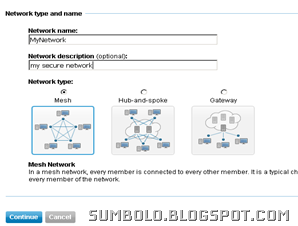

hamachi Network type selection
Click continue.

Hamachi Network Configuration
Now setup network options according to your needs (see the above screenshot).

Configure Join Request options (You can leave the default settings).

You can enter an optional password.

Click continue.

Click Finish
hamachi Registration


Note down the Network ID(see the above screenshot). 
iv - Installation


Download: https://secure.logmein.com/US/products/hamachi2/download.aspx

Install the client on your PC.

Find your network ID

Now run the Hamachi client you just installed.

Go to Network menu and select Join an Existing Network.

Enter the Network ID and password(if any).

Install the client on all the computers you want to join the Network.

And join the network by entering the Network ID and password (if any).

The Hamachi client will show all the computers that are attached to the network.

Every client computer is given a globally unique virtual IP Address.

You can use this IP address to access shared resources on that computer.
Refer to the Hamachi documentation for additional help.
v - Done!
Technorati Tags: Virtual Private Network,VPN


Reblog this post [with Zemanta]

Wednesday, October 14, 2009

Quit UNRESPONSIVE Programs quickly

If you are a windows user you must have experienced the clumsiness of unresponsive (we Maldivians say stuck) applications. When you try to close the “stuck” application a dialogue box appears with an option to End the Task. But most of the times the unresponsive application is not closed, well not at least immediately. What about the famous ALT + F4 ? Well in this case that key combination may not be so helpful.

Luckily a hobby programmer have realized the necessity of a imagesolution, and came up with an Open Source tool called “SuperF4”. What does it do? Well, if an application is unresponsive and  stubborn just press Ctrl+ Alt+ F4. Zap! The currently active application is terminated immediately.

Download: http://code.google.com/p/superf4/


Tuesday, October 13, 2009

THE REVOLUTIONARY OS

In a time when compute industry was completely monopolized,  computer Os were expensive. A group of computer programmers came up with an idea of a free OS. The philosophy behind this idea is RICHARD STALLMAN, the founder of the GNU project. The author of “Open source” definition is BRUCE PERENSE. The Author of Linux kernel when it was first released is LINUS TORVALDS.   

image image image
Linus Toralds Richard Stallman Bruce Perense

When LINUS TORVALDS (student at University of Helsinki at the time), the author of Linux kernel released the first Linux kernel independently, there was no relation with the GNU project. GNU project was writing a free OS independently, but because of the complexity of their very advanced design it was taking a long time to finish the project.

Users who were searching for an alternative free unix, found the pieces of he GNU project which was missing just the kernel. So the end users filled the gap with the Linux kernel. And the revolutionary OS,Linux was born. After that Linus and the GNU project collaborated along with many other programmers on the net to develop the Linux Operating system that we see today.

There are many flavors of Linux, developed by different groups of programmers, all of them based on the Linux kernel.

Watch Video on the revolutionary OS (1 hour 25 Minutes): http://video.google.com/googleplayer.swf?docid=7707585592627775409&hl=en&fs=true


Monday, October 12, 2009

FREE PARENTAL CONTROL SOFTWARE

Internet has become an essential ingredient of our life today. Without internet our life becomes extremely difficult in this information technology era. Unfortunately internet is not controlled by any authority, therefore the content on internet cannot be censored or monitored. Some countries introduce internet filtering by enforcing regulations on ISPs. However all the restrictions introduced by ISPs can be bypassed, sometimes very easily.

As a parent, a brother or sister you wouldn’t want the younger ones in your family to watch nasty stuff out there on the internet. The question is how do you control what they see? I know that there are many software like netNanny, cyberPatrol and Web Watcher, BUT they cost a fortune!

Don’t just give up yet. There are very good free alternative solutions. Some very good free parental control solutions:

1 k9 web protection
K9 web protection is a good free alternative solution for internet filtering. Configuration is minimal. The software knows which sites are not proper for the children. You can configure it through a browser based GUI interface.
Download: http://www1.k9webprotection.com/
2 open dns
OpenDNS introduces a different approach of filtering improper sites. No software is necessary. You only need to sign up to the free service and configure your DNS server with the DNS server address they provide. If you are behind a router you can configure the router DNS server address with the address provided by OpenDNS. The configuration is done online.
Website: http://www.opendns.com/

Both of these products have good documentations on how to install and use the services. Choose what’s best for you. Enjoy!


Jailbreak iPhone OS version 3.1.2

The iPhone Jailbreak dev team cautioned iPhone users from upgrading to the newest iPhone os 3.12. You wont be able to jailbreak your iPhone if you have upgraded to the newest OS. Well, not anymore. Another team has come up with a tool called "Blackra1n". Make sure you have the latest version of iTunes. I haven't tried this tool myself. But if you want to give a try then run for it. Link: http://blackra1n.com/ To download scroll to the bottom of their website and click the windows icon. There you go. Enjoy!